The Challenge
Standard medical check-in software is frequently rigid, visually cramped, and exhausting to navigate prior to an appointment. When intake systems fail to account for complex real-world physical and cognitive constraints, physical strain and mental fatigue accumulate rapidly, leaving vulnerable patients reliant on others or leading to preventable input errors.
To solve this, I designed a multi-device health intake interface using principles I developed through my studies and hands-on experience as a clinician rehabilitating individuals with progressive neurological conditions. This includes applying frameworks from Augmentative and Alternative Communication (AAC), neuro-rehabilitation, and my direct work with exhausted caregivers and patients with motor tremors, paresthesia, and visual field cuts. By structuring layouts to accommodate alternative access methods like eye-gaze tracking and switch access, I created an intake system that protects data integrity while giving patients independence and dignity.
Core Design Solutions
Hardware-Integrated Recalibration Scaffolding
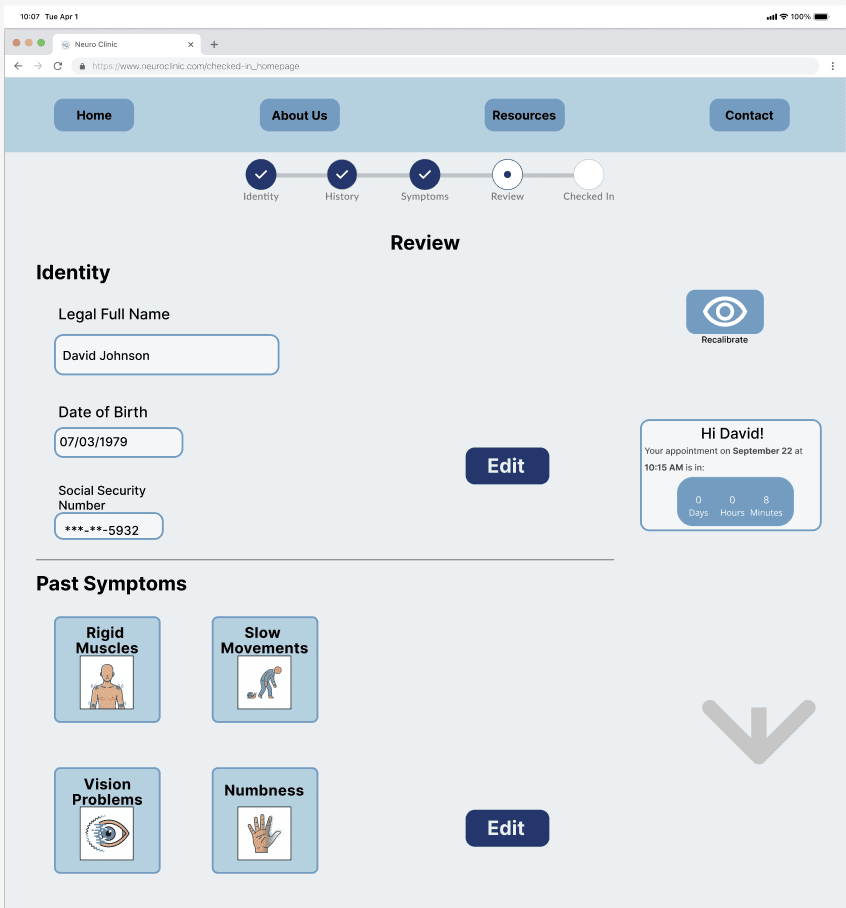
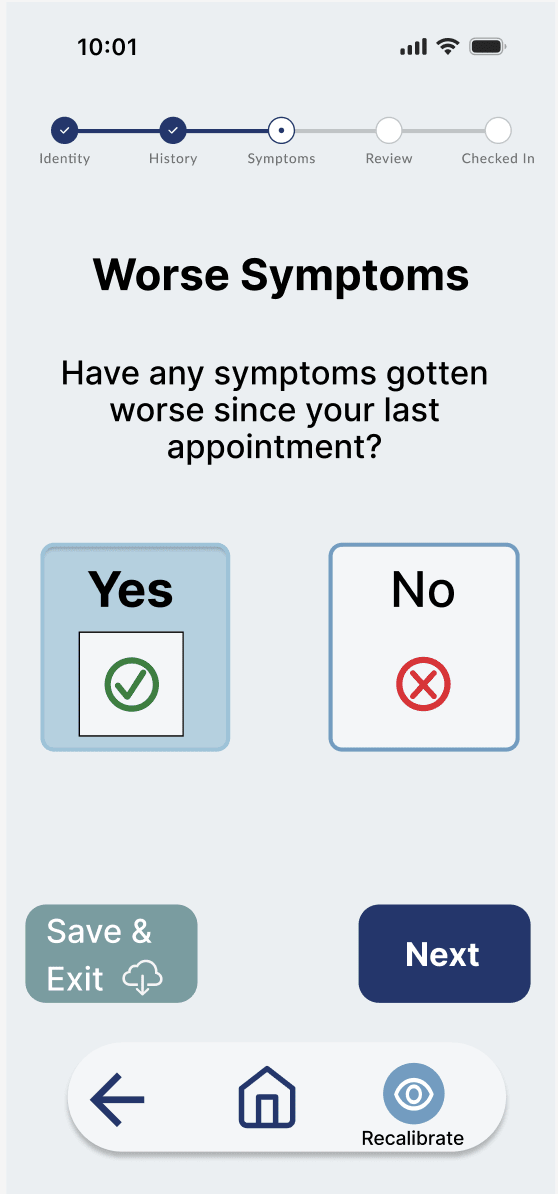
I designed a persistent, full-screen recalibration trigger and auto-save architecture tailored directly to eye-gaze tracking constraints. When mid-session gaze drift or posture shifts occur, users can instantly recalibrate their tracking hardware without losing form progress, eliminating the anxiety of lost data and accommodating physical fatigue during extended access sessions.

Spatial Target Separation & Eye-Gaze Optimization
I configured input options and navigation controls to clear out cramped UI boundaries. By centering interactive elements, increasing target padding, and integrating 1.5-second dwell-time thresholds on edit controls, I created distinct, predictable touch and focus zones. This directly reduces mis-taps for users managing fine motor tremors, as well as selection errors for eye-gaze users experiencing ocular drift.
Tactile Neuropathy & Tremor Safeguards
To accommodate users with paresthesia or loss of physical sensation, I designed every interactive component to trigger an immediate visual state change paired with distinct haptic cues. Additionally, I built a 300ms input delay directly into the front-end logic to filter out involuntary muscle spasms, preventing erratic double-clicks while assuring users with severe neuropathy that their intent was accurately captured.
Clinical and Design Impact
WCAG 2.1 AA Compliance: Engineered a responsive web architecture centered around Tobii Dynavox 12-inch hardware specifications, incorporating blue-light mitigation, full-screen mid-session recalibration, and high-contrast visual scaffolding.
Real-World Usability: Showed how AAC and neuro-rehabilitation principles translate directly to health technology. Designing for severe motor tremors, paresthesia, and ocular fatigue restores patient autonomy during pre-appointment check-ins while ensuring accurate data collection for clinical staff.
Want to see the complete case study?
I’ve put together a full presentation deck that breaks down the complete clinical rationale, spatial grid dimensions, usability testing findings, and safeguards.
Request the Full Case Study